|

| Configuration component |
Perl 5
| ZIP File | Windows 9x SFX | Windows NT SFX |
|---|---|---|
| WinEdt_PerlCC.zip (385 K) | WinEdt_PerlCC_9x.exe (411 K) | WinEdt_PerlCC_NT.exe (411 K) |
| Last update on: 27.11.2001 | ||
About
This configuration component contains highlighting, active strings, menu and tool bar customizations for Perl 5.
Installation
The contents of a ZIP file should be extracted in %b\Config\Perl directory. Note that %b is different from %B. While %B always means the WinEdt program directory (usually it is C:\Program Files\WinEdt Team\WinEdt) %b means:
- on Windows 95/98/Me:
- equals %B
(usually it is C:\Program Files\WinEdt Team\WinEdt) - on Windows NT/2000/XP working as Administrator (or single user mode):
- equals %B
(usually it is C:\Program Files\WinEdt Team\WinEdt) - on Windows NT/2000/XP working as an ordinary user:
- equals <userprofile>\Application Data\WinEdt
(usually it is C:\Documents and Settings\<username>\Application Data\WinEdt or C:\WinNT\Profiles\<username>\Application Data\WinEdt)
To make this easier this macro component is distributed in three packages:
- Plain ZIP file WinEdt_PerlCC.zip for general purpose. Unzip it to %b\Config\Perl and execute install.edt
- Self extracting ZIP file with installer WinEdt_PerlCC_9x.exe for users that are using Windows 9x/Me or Windows NT/2000/XP as Administrator. By default the installer sets the target directory to C:\Program Files\WinEdt Team\WinEdt\Config\Perl After installation the Explorer opens in the target directory allowing you to open install.edt in WinEdt and execute it via install.edt
- Self extracting ZIP file with installer WinEdt_PerlCC_NT.exe for users that are using Windows NT/2000/XP as an ordinary user. By default the installer sets the target directory to <userprofile>\Application Data\WinEdt\Config\Perl (usually C:\Documents and Settings\<username>\Application Data\WinEdt\Config\Perl or C:\WinNT\Profiles\<username>\Application Data\WinEdt\Config$name). After installation the Explorer opens in the target directory allowing you to open install.edt in WinEdt and execute it via install.edt
What does it contain?
After installation a submenu called is added (Figure 1), which has the following items:

- : Load all menu and toolbar customizations
- : For adding customizations for non-standard modules
- : For removing installed customizations
Highlighting
To see the highlighting answer 'Yes' at the end of installation or you can later open sample.pl file by hand.
The highlighted items (switches):
- scalars of the form: $a-zA-Z_0-9
- arrays of the form: @a-zA-Z_0-9
- hashes of the form: %a-zA-Z_0-9
- typeglobs of the form: [ =]*a-zA-Z_0-9
- subs of the form: &a-zA-Z_0-9
- references of the form: \$a-zA-Z_0-9, \@a-zA-Z_0-9, \%a-zA-Z_0-9, \*a-zA-Z_0-9, \&a-zA-Z_0-9
- last array index: $#a-zA-Z_0-9
- interpolated strings: "?"
- literal strings: '?' including '...#...'
- executable strings: `?` including '...#...'
- regular expressions: /?/?/[;geios),]
- sub names: sub *name* {
- Perl keywords
- Perl standard functions
- Perl Escapes (\n,\t,\r,\S,\s...)
- Perl Top Classes (XML, HTML, Win32, ...)
Active Strings
| String | Action |
|---|---|
| {{ | inserts a block |
| openn | starts the open wizard |
| opendirr | opendir-readdir-closedir |
| iff | if-else block |
| whh | while block |
| dow | do-while block |
| dou | do-until block |
| csss | case like statement |
| subb | inserts the contents of the file %b\Perl\subhead.pl |
Insert Menu
All Perl 5 functions grouped by function (Figure 2).
: inserts the contents of the file %b\Config\Perl\new.pl
: inserts the contents of the file %b\Perl\subhead.pl
: starts the open wizard

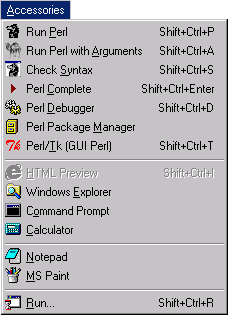
Accessories Menu
| Item | Action |
|---|---|
| Run Perl | runs the Perl interpreter 'perl.exe' (it has to be in your PATH) |
| Run Perl with Arguments | prompts for arguments to Perl interpreter (NOTE: by default the prompt contains 'perl.exe' do not delete it) |
| Check Syntax | checks the current file's syntax by invoking 'perl -c "%f"' |
| Perl Complete | complete the current perl data type (scalar or array or hash or subroutine or typeglobe) from current file, i.e. you can easily reuse (long) data type identifiers. The shortcut is CTRL + SHIFT + Enter |
| Perl Debugger | runs the perl debugger by invoking 'perl -d "%f"' |
| Perl Package Manager | runs 'ppm.bat' (it has to be in your PATH) |
| Perl/Tk (GUI Perl) | executes a perl script without the command prompt by invoking 'wPerl.exe "%f"' (it has to be in your PATH) |
Help Menu
help and are added (Figure 4).

Perl Dictionary
All perl keywords and functions are listed in two forms:
- function name only
- function name and its arguments
Mode contributed by D Stancer (denis@srce.hr)